Welcome!

Welcome to my A Level Media Blog. My name is Joshua Brooks [0110] and for this project I am working in Group 5 with Vivian Oparah [0621], Sebastian Hodge [0330] and Louis Caldwell [0131]. Under the heading 'Labels' of the left hand side of the page, you are able to filter post from the project's various stages of production. At the bottom of the page is a link to older posts also. Click the link listed below for Group 5's Facebook page, which contains evidence of production work from throughout the project. Thanks for taking the time to read this and I hope you enjoy the rest of my blog!

NTLS Final Music Video


NTLS Final Music Video

NTLS Final Digipak

NTLS Final Digipak
NTLS Final Digipak [Right click to open larger image in new window]

NTLS Final Website

NTLS Final Website
NTLS Final Website [Right click on the image to open the website in a new window]

Twitter

View our Group Twitter page here:

https://twitter.com/NTLSmusic

Facebook

View our Group Facebook group, which we used to administrate the project, here:

https://www.facebook.com/groups/1538872199681204/?fref=ts

29 Dec 2014

[Q3] What Have You Learned From Your Audience Feedback?

The audience feedback for the projects allowed us to see if the video and texts we had produced were as effective as we had designed them to be. It allowed us to compare what we thought was best for the audience with how the audience actually wanted and liked about our project.

OUR TARGET AUDIENCE
Quite early on with our project we pinned down exactly what kind of people we were going to target with our project. We planned that we would appeal to fans of the alternative/electronic genre primarily, regardless of sex or age. Our secondary audience would consist of Electronic/Alternative fans ageing from late teens to early 20s and for the tertiary audience we would aim to target people ageing from their late 30s to early 40s.

PRIMARY AUDIENCE
We chose to target alternative/electronic genre fans of any any age or gender. This was to make sure that NTLS had the widest appeal possible.


As this alternative/electronic scene is quite large and stretches across various age ranges we assumed music would be consumed in a variety of different ways. Streaming and downloading would be common among the younger audiences, especially it is the cheaper alternative and they have a lower disposable income than the older generation. The older audience we assumed would opt for buying music as a hard copy vinyl or CD. Overall though, it was generally considered that all audiences would be willing to attend live performances and buy into the artist.

SECONDARY AUDIENCE
Our secondary audience consisting of Electronic/Alternative fans ageing from late teens to early 20s we thought we could appeal to easily as this is the age range in which the genre is most popular. The NTLS artists LuLu and Nathan are also this age and so this is the audience that can relate to them the most.


 This age range tends to download music either legally or illegally, which would lead to reduced sales of the album. However, this is also the age range that spends the most money on live events which is beneficial to when NTLS tour. This audience would also listen to radio stations such as BBC Radio 1, and use websites and social media such as Twitter, Soundcloud, Instagram and Facebook.


TERTIARY AUDIENCE

People ageing from their late 30s to early 40s we thought would like NTLS' music due to its slow pace, and seeing as comparatively they have the most disposable income they would be wise to target due to the likely hood of purchasing NTLS products, particularly vinyls and CDs.


USES AND GRATIFICATIONS
We referenced Blumler and Katz's Uses And Gratifications Theory when making our video, as we wanted to make sure that we appealed to our audience as much as possible. This could potentially in turn encouraged them to both purchase the album, and become a fan of NTLS.

DIVERSION
- The way in which the audience build up a relationship between the couple seen in the VHS footage over the course of the video is captivating to the audience, especially the early 20s/late teen audience, as the relationship is entertaining, fun to watch and also relatable seeing as the actors are of the same age. Below is a breakdown that group 5 put together of the character's relationship throughout the video:


- The studio scenes are also visually striking and provide something that draws the viewers attention. We designed them so that the audience's eyes would not stay in one place for to long, as we felt that the speed of the song was slow enough already and that people may lose interest. They were also meant to aesthetically please the viewer in a way which encouraged them to watch the rest of the video.


The shot changes 5 times in 6 seconds and I'm moist lol prawnjape banter yoloswag

RELATIONSHIPS
- With the content of the song focusing around the theme of relationship and still loving someone you have broken up with, we made sure that the focus of the video's narrative was also about this topic. This allowed viewers to empathise with the characters in the video as the situation is something most people have to deal with.


- The nonsexual relationship present in the studio shots of the video was one that the audience could recognise as a performance between the two artists on the songs message. Neither artist was sexualised for audience appeal and the pleasure of the viewer came from the aesthetics of the setup and choreography, rather than from the artists themselves.


IDENTITY
- The way in which the couple's relationship is presented some people would envy, particularly the secondary target audience in this case as the couple are their age. Although the relationship between the couple does deteriorate towards the end of the video, it is clear they are in a loving relationship at the beginning of the video.


- Fans would aspire to the artist's personas. The way they dress, act and look are all typical for fans of the Electronic/Alternative genre. Fans of NTLS would aspire to be like them and see them as an icon in terms of what the Electronic/Alternative scene is about.


AUDIENCE FEEDBACK
RESEARCH AND PLANNING
Digipak
When designing the album cover and researching other artist's examples, we decided that the idea to use a panorama across the front and back of the digipak would be really aesthetically pleasing to the audience. Before going ahead with the idea we asked members of our target audience what their thoughts were on the cover.

Mock-Up of panoramic album cover idea
Feedback from a member of our primary audience about the digipak:


Using the feedback as a guide we designed a graphic that could go on the front of the digipak, testing different layouts and shapes that we could use.

After the changes, the feedback from people was really positive. The circular design was a lot more popular as people thought that it looked more abstract and so we decided to continue with this idea.

Website
The theme of using the album cover for an artist on their website was present on a lot of Electronic/Indie websites we researched. We drew out a plan on paper and then recreated it on the computer using the web tool 'Wix'.


Asking friends and family we knew were electronic/indie fans for feedback on our design, the majority of people thought that the idea of having an album cover similar to the website kept the band's image well and looked really stylised due to how they were slightly different to each other. We decided to maintain and work around this idea in the construction phase as a result of the positive feedback we had received.

Music Video
To showcase the performance and narrative ideas we had began to think of, and to give us an idea of how the video will look when complete, we made an Animatic (a series of stills editied into sequence) and Steal-O-Matic (a collection of footage taken from other videos similar to our idea).

The final animatic and stealomatic were shown to people within our target audience. The first comments we received were about how we had left gaps for the archive footage shots. We had purposefully done this to avoid planning the shots too much, leaving room for spontaneity. However, after discussing the feedback received we decided on adding stills to give us a guide to the shots we wanted and how they would look. Other than that people really liked the video and thought the VHS footage was a really unique selling point.

The revised stealomatic was also critiqued by friends to iron out any problems with the structure.


Our target audience thought the overall structure was good but we should play with cuts and the music more to avoid it becoming repetitive, otherwise it was perfect for a music video.

CONSTRUCTION
Over the course of the construction phase we managed to obtain various feedback for our products that we used to improve the quality of our project.

Digipack
- The NTLS logo on the inside was changed from a picture LuLu on her own as it was suggested that it  would strengthen band image as well as brand image


Before


After

- We were advised to include a QR code on the back which when scanned takes the person to the website, as this would allow for greater synergy between the two platforms.


Before


After

Website
- The tour page was quite empty and so we decided to include more information on the tour page of the website. We added a Twitter feed and an advert for the BBC Radio 1 performance, showing symbiosis with other companies.


- On the CONTACT US page people thought that more information for institutions, such as Red Pigeon Records, needed to be included and so we added a map and emails for the offices in Westminster.


Video
We managed to host a miniature screening for friends who enjoy Electronic/Alternative music to see what they thought of the video:


Acting on the feedback given to us, we changed and reshot the end sequence and added some performance footage from the studio in to create variety rather than stick with the same style of video.

- A lot of people after watching the video thought that the narrative progression of the couple's relationship was not strong enough and needed some kind of ending. To amend this, we rearranged some of the VHS sequences and filmed an extra scene for the end of the video.


The initial ending we shot was too bright due to us having used the wrong settings on the camera, so we were advised to reshoot them with the right settings as it was quite off-putting for the audience.


The difference with the footage was obvious, and other people from our target audience we asked about this scene did not pick on anything wrong after this change. 

- Some shots too bright and needed to be graded better. With the limited grading software in Adobe Premiere Pro we resorted to Adobe After Effect for more advanced tools to fix the grading of these shots.

A comparison between the graded picture (right) and ungraded picture (left)

WEBSITE
After completing the construction of the website we asked members of our primary, secondary and tertiary audiences for feedback.


All of the people interviewed recognised the website as one of the electronic/alternative/indie genre. Audience members really like the level of interactivity with the website; how you could buy their merchandise and visit their social media pages especially. The branding was "strong and recognisable", with people acknowledging the graphic as a universal logo. Suggest changes were to include more logo saturation with the dotted album cover graphic seeing as it was featured on the album cover and website, but overall the website was a success.

ALBUM COVER
We conducted the same interview for the album cover also, asking similar questions about what the interviewees thought about the products.


Again the electronic/indie/alternative genre was strong with the design of the album cover, with all those asked identifying it as so. The monochrome colour scheme was noticed as well as the link between the main page and the digipak cover; "everything marries really well with each other". Some thought that some lyrics to songs could have been included with the album, which was a good suggestion as fans of the indie/alternative/electronic like to learn the lyrics of their favourite songs usually.

MUSIC VIDEO
In order to get feedback for the music video we decided to create an online survey that our target audience could fill out using the web tool 'surveymonkey'. We uploaded a link to both the video and the survey on Facebook and waited for people to answer.


This was posted on my Facebook wall so that friends and family could easily access the links

This was a really great way of recording feedback as it was anonymous so people were honestly critical  about the video, addressing both negatives and positives about it.


 The majority of people thought that the video was a 'clear and engaging music video'

We asked people various questions about the video, trying to find out what they thought of the video to get an idea of how effective it had been in pleasing the audience.


With questions like 'What genre does the video reflect?' it was good to see that 100% of those asked thought it fell under either the indie, alternative or electronic category. This meant that we had been successful in producing a video that did intact reflect our genre.

We also asked people some questions that were not multiple choice in order to gain feedback that was wholly their opinion. These were questions were the person could write in a text box and submit their answer, so we had a range of replies


The narrative of the couples relationship was clearly understood with examples of people's answers to the question "What do you think the message of the video is?" being "relationships can break down because people change as individuals, even though they may still love eachother and may want to stay together it is not always possible" and "The singers the story of a deteriorating relationship, the song ends with a break up". This indicated that the majority of audiences saw the video was about a relationship.

With the question "Finally, do you think that the video and its presentation of the artists is professional/believable? Is there anything you would change about the video?", we were intending to receive some constructive criticism about the video and how we could improve it. 


"V professional, the ending where the boy left the house and looked back was kind of predictable"


"I think the artist image is believable and interesting. The one negative thing I would say is that I thought some of the VCR shots could have been more shaky to contrast the studio shots. The final bits where Louis walked out could have been shot a little better but that's only minor. To conclude, great visually, strong acting, very believable artist image and overall a really good tone for the video that matches the song very well"


"Very stylised and professional, but would be more believable if singers looked older and if there was more alteration in costumes"


"Better video quality"

The answers ranged in length and detail but overall people really loved the video. The artist image was believable in all cases, although some thought that if the artists had been older it could have worked better as a music video. The narrative also got some really positive feedback, with most liking the contrast between the studio and VHS shots. Some thought the VHS shots were too static, and others disliked the lack of quality, although these were both minor faults. The structure of the relationship went down really well also, although "the ending where the boy left the house and looked back was kind of predictable" in one person's opinion.

We also managed to get some reaction videos of people watching our video for the first time:


Overall, I feel that the music video gratified and pleasured the audience well. In hindsight, I think that using an actual VHS camera got the best footage stylistically but was not necessarily the best choice for quality and that's and area that the video lacks in for me. It also caused a lot of problems in the editing department, so maybe it would have been more efficient to shoot on a camera with better quality video that could be edited to look like VHS. 

28 Dec 2014

[Q4] How Did You Use New Media Technologies In The Construction And Research, Planning And Evaluation Stages?

RESEARCH AND PLANNING
SOCIAL MEDIA AND WEB TOOLS
- During the research and planning stage of the project we used Facebook a lot to organise the project and share ideas. We created a group in which everyone could share and post directly to the page for everyone to see.


The group 5 Facebook chat where we could post and the group
 chat where we discussed key decisions about the project

Facebook's features, such as the 'seen' tool was really helpful, as it allowed us to tell exactly who had seen which post so that we could get everyone up to date on what was happening. We could also comment on pictures uploaded, which was really useful for our group especially as we were not always available to give feedback to each other as a group due to our lesson timetables being so different.

- Youtube was one of the main research tools we used to find influences for our video. We used the playlist tool to create a list of influential videos which anyone in the group could access and add to, rather than having to create a list of links off site.


The group 5 'influences' playlist on YouTube

 The playlist could then be shared and embedded on other sites too which was an added bonus. Uploading research and planning videos quickly and easily for all the group to see anytime they wanted was also a useful feature, which we used when discussing the videos progression and timeline of events.

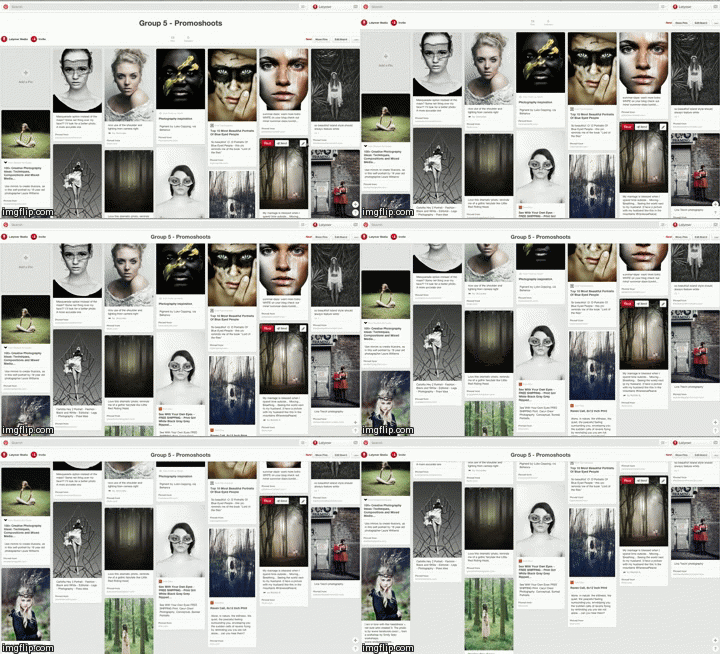
- Pinterest was a a really helpful tool for all aspects of the project. We used it to find influential photos for makeup, costumes, locations, styles and more. When searching on pinterest we pinned photos we liked to boards we made which could be shared and added to by anyone in the group. It was a really easy way of sharing ideas and also explaining to other members your ideas visually.


Pinterest moodboards containing influential images for promoshot and artist image 

- We used Google hangouts to conduct meetings outside of school hours, as a lot of the time none of us were free at the same time as each other. We called each other, discussed ideas and developed the projects direction from our home computer.


Screenshots from a Google Hangouts session


The really useful thing about using hangouts rather than any other video calling software was that it was part of Google, which meant that apps such as YouTube and Google+ were already embedded into the program and made sharing videos or pages really easy.

MOBILE PHONES
- We used our phones a lot to organise events or meetings over the course of the project as it was an easy way to contact each other at any time and anywhere. Apps such as Google Hangouts and Facebook could also be accessed through our phones as well, which meant we could have meetings or access photos on the go and not necessarily just from home.


The app icons for Facebook, Facebook Messenger and Hangouts

- As our phones were able to access social media, this meant we could take photos or videos on our phones and then share them online to the group. We even used our phones on test shoots to get an idea of what certain shots would look like. It was also an easy and accessible way of recording the projects progress, either on set or behind the scenes.


Images taken on a phone during a studio session

CONSTRUCTION - PRODUCTION
CANON 5D MKII


The Canon 5D MKII was the camera we used to record the studio footage because of its high quality and professional standard. Recording in 1920 x 1080p with a 16:9 aspect ratio the footage was very much HD. It also allowed us to change settings manually, such as ISO or exposure, which was really helpful in creating the white infinity backdrop.

LEAPFROG LIGHTING DESK
- The Leapfrog lighting desk was used in the studio to create the professional look seen in the video. The lighting desk controlled an array of Arri 1000K Lights, which we could alter depending on how we wanted each setting to look like. 


Me working at the lighting desk and the lighting desk itself


We were taught how to use the lighting desk by the media technician, as most of us had not used the desk before the project and had no idea how to control it. One problem we had with the lighting was having to reposition the rigs before every studio session. As we were sharing the studio with other groups, we had to move the lights before each shoot, as different groups had different lighting set ups. This meant a lot of time was wasted, however this was unavoidable, so we had to just light as quickly as possible whilst keeping to schedule.


MOBILE PHONES
- Mobile phones were an essential part of the evidencing process, as a lot of the time they were to most convenient method of capturing information. We even used our phones as a way of transporting shoot boards and schedules which was really useful, especially on locations outside of the school where we had to carry all of the kit we were using around with us.


CONSTRUCTION - POST PRODUCTION
ADOBE PHOTOSHOP
- The majority of the album cover was designed on Adobe Photoshop due to the amount of editing and layering that was involved in piecing all of the components together.


The main graphic was really complex and involved using multiple photographs then creating a clipping mask to use a selected area of that photo.


I created the graphic using circles of different sizes, then positioned them so that they fitted next to each other. Editing the photos that feature on the album cover was also done on Adobe Photoshop.

- Adobe Photoshop was really useful for editing the large amount of promotional photos we had taken both in and out of the studio. The studio photos were relatively easy to edit as they were all pretty similar lighting wise, however there were a few problems that held back the process slightly. The photos taken in the studio had a line across the back of them where the curtain across the back hit the floor, which had to be edited out for each photo in order for the infinity effect to work.

Also lighting in some sets of photos were different than others as they were taking on different days, meaning that the settings changed such as brightness, contrast, vibrance and saturation had to be adjusted for each individual set of photos which consumed a lot of time.


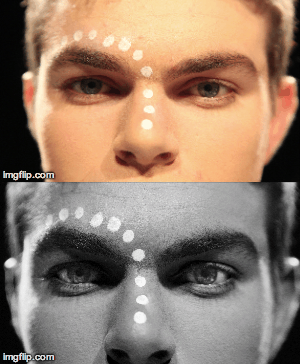
The original images (full colour, unedited) and the result (monochrome, edited)

- As we did not actually make any of the merchandise advertised on the NTLS website, we had to photoshop the logo onto various pictures of items found on retail websites.


ADOBE ILLUSTRATOR
- Originally the NTLS logo was hand drawn, so in order to transfer it to a crisp digital file, Adobe Illustrator was used. The hand drawn image was scanned in and once in Illustrator, I used a tool that traced the image and created an editable digit able version. I neatened up the edges of the logo and straightened up the lines until the final logo was complete.

ADOBE PREMIERE PRO
- To edit our footage we used the software Adobe Premiere Pro. Using Adobe Premiere Pro was useful in a number of ways when editing the video, as we we able to edit the footage in a non-linear fashion, meaning it didn't matter what order we edited our footage in.


The premiere timeline for the video edit

Adobe Premiere Pro was also useful as we could have multiple sequences when editing and could test out editing techniques on a separate sequence from the final edit. We used these separate sequences to create short tests, creating narratives for the VHS parts that we could change around and reorder if we needed to before putting them onto the final timeline.

On top of the standard editing techniques used for the timeline, we used some of the editing tools to alter the framing or speed of shots. Where shots were too wide, we cropped the image by using the scale tool to increase the zoom, then the positioning tool to change its position in the frame. If a shot was too fast, we slowed it down using the speed duration tool.


The annotation shows how the video was put to 50% speed

- Grading using Adobe Premiere Pro was quite easy, as the tools we used were quite straightforward. Procamp was a tool that changed the saturation, brightness or contrast of a shot. Three way colour corrector was also used, and allowed us to isolate the darker, mid and light tones of a shot and change them.


The grading interfaces within Adobe Premiere Pro

HONESTECH RECORDING SOFTWARE


- Honestech was an external software that we downloaded in order for us to be able to capture the footage off of the VHS camera. The software was really straightforward to use and meant that the footage was of a format that we could edit into the final video of our project. The VHS camera was also really easy to use but we had to be carful each time we went out to record footage as it was analogue. This meant it recorded onto tape and would rewrite over any footage we had not taken off of the camera. The battery life of the camera was quite short as well.

The main problems we had with the camera were that it shot in 4:3 and not 16:9 and also the fact that the VHS automatically dated footage with a watermark that showed up on screen and could not be removed. Both of these problems were solved in post production though so the project was not jeopardised.

The black bars and box around the images are a result of the VHS filming in 4:3


An example of the video watermark showing the date we filmed the footage

ADOBE AFTER EFFECTS
- We did not originally intend to have to grade in Adobe After Effects but because of problems that arose with our footage we were forced to in the end. Some shots in our music video were too over exposed and the editing software within Adobe Premiere Pro did not allow us to correct it. To fix this problem, we had to open said shots in After Effects, which allowed us to isolate specific colours, which wasn't difficult luckily.


Once in After Effects, we used a plugin called Colour Finesse


The interface for Colour Finesse was a lot more complex than Procamp or Threeway Colour Corrector, but it didn't take long to learn how to use, as the principals of using sliders to change certain aspects of the image were the same.


SOCIAL MEDIA AND WEBTOOLS
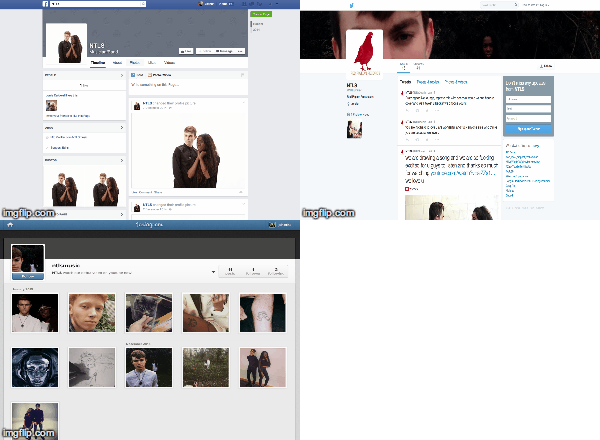
- When creating the NTLS website, we decided to include various social media links to improve audience interactivity with the artist. We created a Facebook page, a Twitter page and an Instagram page which we updated as frequently as possible over the course of the project, with images and posts relating to the release of the album.


- The Wix website creating tool was a brilliant app that we used to create a mock website for the artist NTLS. This was good technology for us to use as it was designed to be easy to use, and didn't require HTML coding, which would have been difficult for us to learn. A problem I found with Wix was that we were limited slightly with creativity, as we were only able to use preset widgets and apps provided by Wix. On the other hand, this meant that we could easily add features to our website, such as a live feed of the band's social media pages that we may have not known how to add if we had had to code the widgets ourselves.

EVALUATION
SOCIAL MEDIA AND WEB TOOLS
- We also used an online survey conductor called SurveyMonkey, which allowed us to collect and analyse feedback. SurveyMonkey was good to use as it was easy and straightforward to use for those filling out the survey. We were able to ask as many questions as we wanted and were able to customise the survey to get the best data possible, asking both qualitative and quantitative questions, depending on what fit best. It also allowed for anonymous responses, so those filling it out didn't feel pressured to give details they did not want to give.


- After writing up a survey on Surveymonkey, we posted a link to both the video and survey on our Facebook walls for people to fill out. The results were easy to analyse as they were presented on the website in tables.


QUICKTIME PLAYER

QuickTime Player is an application that allowed me to record my computer screen. I used this application to show how websites, apps and software worked, recording it in a video and then converting it to a GIF


MOBILE PHONES
- We also used our mobile phones to record audio and video interviews of people reviewing our products from the project.